













Your AI builds the moodboard with real references.

Draftt's MCP connects Claude, ChatGPT, Codex or Gemini to your boards: it searches references, lays them on your moodboard with their credit and builds the deck.

Claude

  • search_referencesdesert, motels
  • create_boardRoute
  • add_references_to_board6 references
  • create_deck5 slides

Done. Route has 6 references and a 5 slide deck.

Route
Route

5 slides

Claude

Your AI can write a brief.But it has no eye.It searches Google and brings back stock.Draftt gives it real references.

References for a sneaker commercial: all red, studio set, a bit of humor.

Claude

I'll search one axis at a time in hand-curated collections: the color, the set and the tone.

Used Draftt's MCPsearch_references ×3add_references_to_board

Found 36 references. The strongest are already on your board, each with its credit:

All red

  • Red is the set, not a filter

    Painted carpet and walls; skin and light stay natural.

  • High window light

    Hard and from the side, it cuts the figure out of the background.

  • Still, wide shot

    The empty space sets up the joke before the character does.
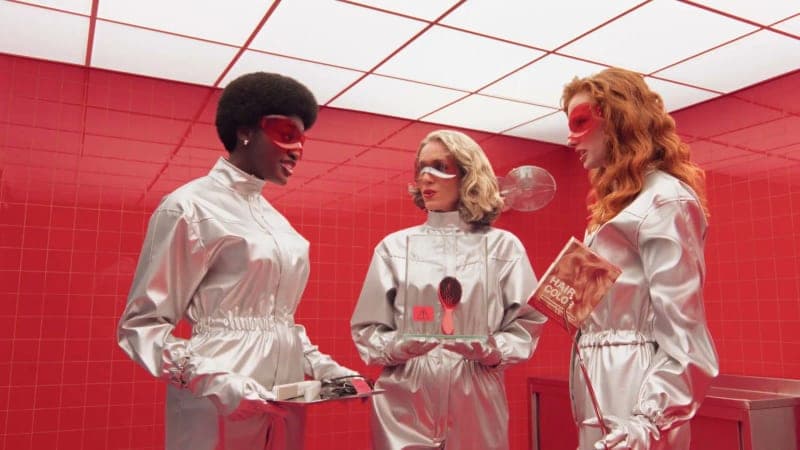
Studio set

  • Wardrobe against the set

    White suits that pop off the red without fighting it.

  • Overhead light grid

    The ceiling adds graphic rhythm and an even, lab-like light.

  • Three in a row

    Frontal, almost comic panel framing: it reads at a glance.

Humor

  • The face tells the joke

    A pushed expression and an off-frame look; no dialogue needed.

  • Graphics as set design

    The red tiles turn the background into a game.

  • Frontal and centered

    Symmetry that feels like an ad, on purpose.

Product

  • Floor level

    A low camera makes the sneaker the lead.

  • Texture up close

    Carpet, metal and leather in a single detail shot.

  • The red comes back

    Same color as the set: the product already lives in the campaign.

It finds references for you

Give it the idea and it searches stills, commercials and films in hand-curated collections, one axis at a time: the subject, the format, the look.

They arrive credited

Every reference lands on your moodboard with a link to who made it and where it was found. Nothing loose, nothing unsigned.

It works with you, live

Watch it move across the board with a cursor of its own: it sorts, writes notes, adds references and builds the deck.

Ask anything. Get real references back.

  • Find references for a dog commercial: dogs gone wild, handheld, 90s look.

  • Build a neon and rain moodboard for the music video.

  • Find desert sunset references and put them on the Route board.

  • Sort this board by palette and write a note with the art direction.

  • What is this moodboard missing? Find references that fill the gap.

  • Turn the moodboard into a 6 slide treatment deck.

Connect it in a minute.

Add Draftt as a connector in your AI app and authorize with your account. It sees the same boards you do, with your same permissions.

MCP server URL

https://draftt.app/api/mcp
  1. 1Click Connect to Claude: Claude opens with Draftt already filled in (or add it by hand under Customize → Connectors → Add custom connector, with the URL above).
  2. 2Check the name and URL and click Add. Claude's free plan allows one custom connector.
  3. 3Click Connect, sign in to Draftt and choose this workspace.

When you connect, you sign in to Draftt. The app uses your own permissions: it sees and edits what you can, across all your workspaces.

Frequently asked questions

What is an MCP?

Model Context Protocol: the standard way an AI app uses another app's tools. With Draftt's, your AI can search references, read your boards and edit them.

Which apps does it work with?

Claude, ChatGPT, Claude Code, Codex, Gemini and any app that takes a remote MCP server.

Where do the references come from?

From collections people curate by hand on Are.na: stills, commercials and films. Each one arrives with a link to who made it and where it was found.

What can it see and do?

The same as you: the boards and decks you can open, with your role on each. Where you can only view, it only reads.

Can I watch it work?

Yes. It shows up on the board like any collaborator, with its own cursor and color, and every change lands live.

How do I disconnect it?

In Settings, under Connect AI, you see the apps you authorized and revoke them whenever you want.

Your AI is guessing. It doesn't have to.