
Claude Whiteboards is the shared whiteboard Anthropic launched inside Claude on November 10, 2026. You talk, type or sketch, and Claude builds the board with shapes, arrows and sections while your team works live in the same place. It is in beta on every paid Claude plan, and not on the free one.
This guide gathers what the announcement and Anthropic's help guide say, plus what we saw when we tried it for the thing we do every day: a mood board. We make Draftt, a canvas for creative work that Claude connects to over MCP, so keep that in mind when you reach the comparison.
At a glance
| What it is | A shared whiteboard inside Claude, where Claude draws and organizes |
| Launched | November 10, 2026, in beta |
| Plans | Pro, Max, Ultra, Team and Enterprise. Not on Free |
| Price | From Claude Pro: US$20 a month, or US$17 billed yearly |
| Where | Web, Claude Desktop and the mobile app |
| In a call | Claude Meetings, in beta on Team and Enterprise, on Google Meet |
| Closest to | FigJam, Miro or Lucid, with Claude as one more participant |
| Gets out as | A doc or deck, a PNG, or "Send to" Lucid, Miro and Zoho Vani |
How to open a whiteboard in Claude
There are two ways, per the help guide:
- From any chat. Ask for it: "Start a whiteboard to plan our product launch."
- From the Artifacts tab. Pick Whiteboard, describe what you want, or dictate it with the microphone, and send.
Boards are saved in the Artifacts tab. If you do not see it, it may be your plan (Free does not have it) or your organization: on Team it is on by default, and on Enterprise an admin turns it on under Organization settings, Artifacts.
What Claude can do on the board
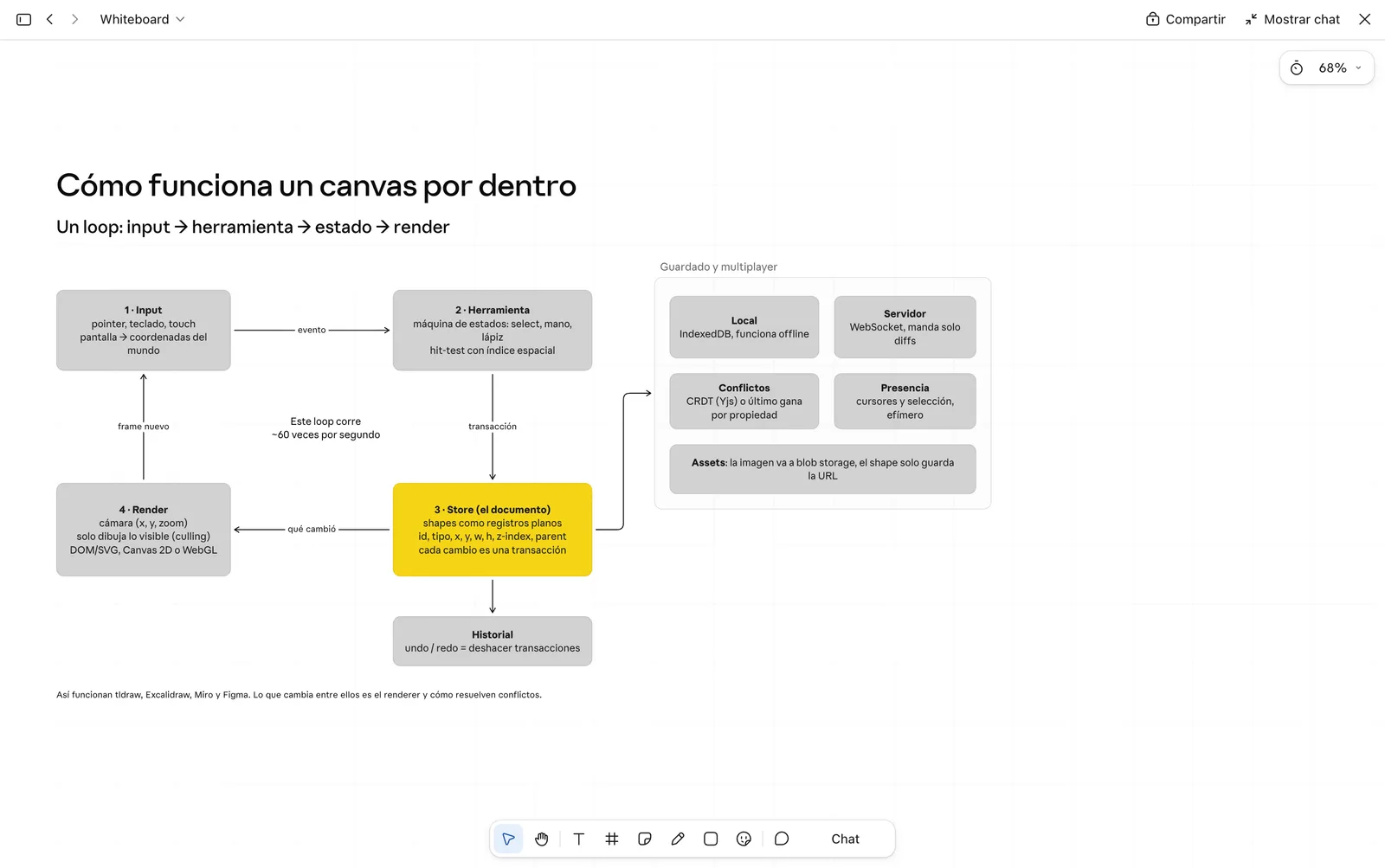
A whiteboard we asked Claude for: how a canvas works inside, as a loop of four steps. The labels are in Spanish because so was the chat.
- Draw what you describe, with shapes, arrows and sections, and organize your ideas into diagrams, flows and groups.
- Reorganize. Ask it to group by theme or to turn the board into a timeline with owners and dates.
- Find the gaps. Claude adds suggestions to the board for you to review.
- Answer about one part. Drag a box around an area and ask about just that. Or select one element, open a comment and mention @Claude: the comment carries what you selected, and with "Send to Claude" ticked, Claude answers about it.
- Pull out action items. In a retro, it groups everyone's notes and drafts action items for each person.
- Turn it into something else. "Turn this board into a project plan" gives you a doc or a deck.
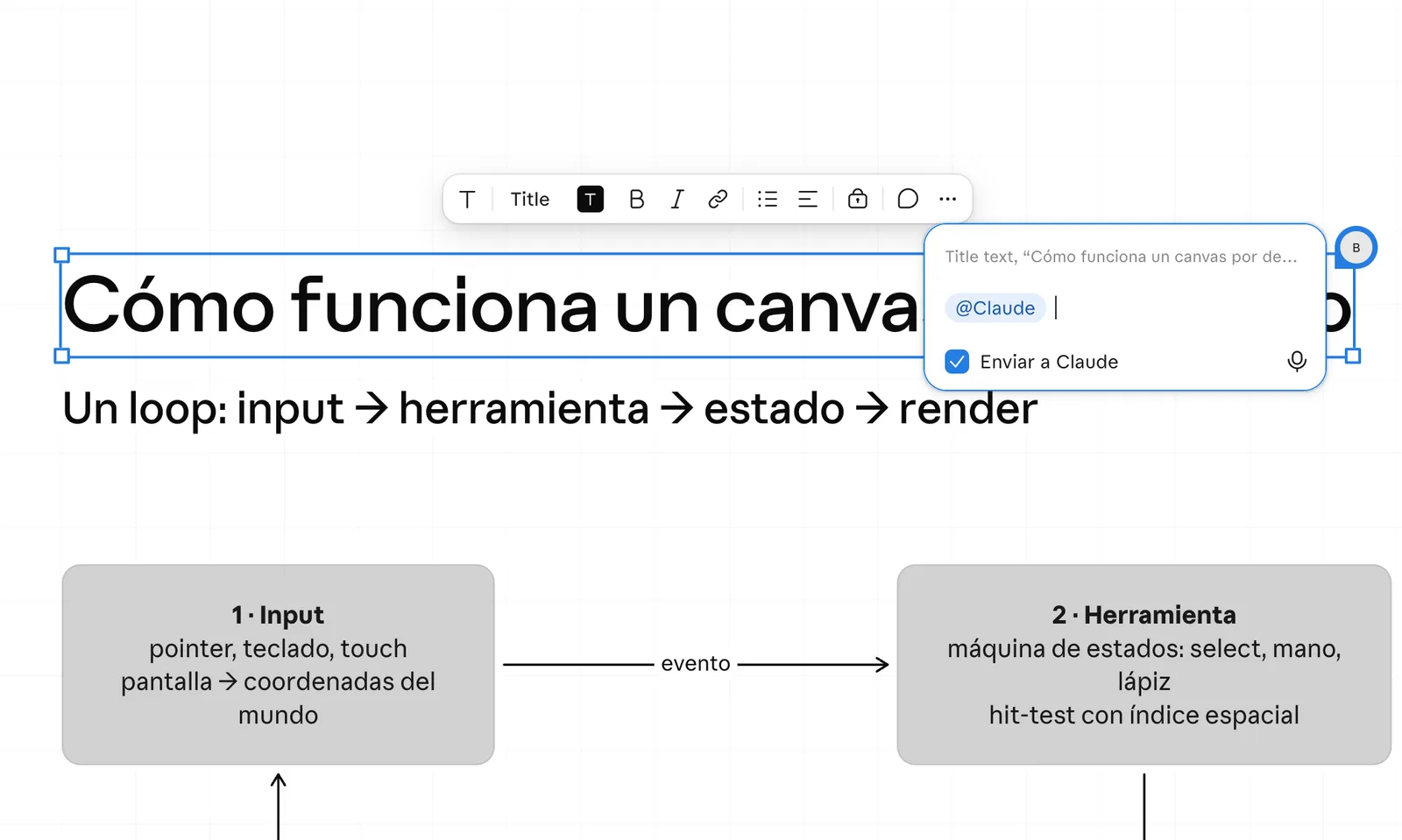
Anthropic's examples are all team work: a retro, planning a launch, laying out the options for a decision, mapping a process from start to finish.
Prompts to try
The first four are from Anthropic's help guide. The rest are ours, for creative work, and they work best when you give Claude the brief in the same message.
- "Start a whiteboard to plan our product launch."
- "Put the options for this decision on a whiteboard, with the trade-offs of each."
- "Map this process on a whiteboard from start to finish."
- "Turn this board into a project plan."
- "Group these notes by theme and draft one action item per person." (After a retro.)
- "Lay out a mood board structure for this brief: three worlds, a palette with HEX codes, light, locations and wardrobe, one section each."
- "Turn this script into a shot-by-shot outline, one box per scene with its location and what the camera does."
- "Plan our shoot day on a timeline: call times, setups, company moves and who owns each one."
- "What is missing from this board before we pitch it?" (Claude adds its gaps as suggestions to review.)
A tip: draw a box around one area before asking, and Claude answers about that part only. It keeps a big board from turning into one long reply.
Sharing and export
Everyone on a board works live and can rearrange it, and you can follow a teammate around the board. You invite people with the Share button. People outside your organization can join by email, if your admin allows it.
There are three ways out:
- A doc or a deck: ask Claude.
- Another whiteboard: "Send to" takes it to Lucid, Miro or Zoho Vani. Anthropic says more are coming.
- A file: Share, Export, PNG. It is the only format for now.
Plans and pricing
Whiteboards is not sold separately: it comes with your Claude plan, and using it counts toward the plan's usage limits.
| Claude plan | Price | Whiteboards |
|---|---|---|
| Free | US$0 | No |
| Pro | US$20 a month, or US$17 billed yearly | Yes |
| Max | US$100 a month | Yes |
| Ultra | US$200 a month | Yes |
| Team | US$25 a seat a month, or US$20 billed yearly | Yes, on by default |
| Enterprise | Custom | Yes, an admin turns it on |
Prices from Claude's pricing page, checked on November 12, 2026.
Limits of the beta
The help guide is plain about them:
- It does not use your connected apps. On a whiteboard, Claude works from what is on the board, not from the context of your connectors.
- It does not import boards from a file. You can add pictures and videos.
- It exports to PNG only.
- It is not available to HIPAA-ready organizations or in Claude for Teachers.
- It is a beta. Things will move: Anthropic says "Send to" will get more destinations.
Claude Meetings: a whiteboard during the call
Announced with Whiteboards as "coming soon", Claude Meetings is now rolling out in beta on Team and Enterprise plans. You add Claude to a Google Meet call as a visible participant, and anyone can ask it out loud for a doc, a whiteboard or slides, which it builds live during the call and attaches to the meeting's page, with the transcript and the chat.
- Plans: Team (on by default) and Enterprise (an owner turns it on). Not Pro or Max.
- Calls: Google Meet only, for now.
- Price: docs and whiteboards made in a meeting are free through February 10, 2027, per Anthropic.
What it competes with: FigJam, Miro and Lucid
Anthropic compares it with nothing, but the use it shows is theirs: retros, brainstorms, flows, plans with dates. That two of them are where "Send to" goes says a lot. Whiteboards is where the conversation starts, not necessarily where the work lives afterwards.
For that use it has a real edge. On other whiteboards, AI is a feature you call now and then. Here Claude is one more participant, drawing while you talk and remembering what you already told it about the project. If your team already pays for Claude, that is a reason not to pay for another whiteboard just for meetings.
We tried it for a mood board
Our work is images, so we asked for ours: a mood board for a car film, with Draftt's MCP connected to Claude.
From the chat, Claude searched Explore, Draftt's library, and filled the whiteboard with 14 references, each with its credit ("Volvo EX90, DP Hoyte van Hoytema"). It pulled two palettes with their HEX codes from those same frames, a golden day and a wet night, and built sections for light, locations, camera and sound. As a structure it was very good, in a couple of minutes.
What did not make it were the images. On the whiteboard, each frame showed up as an empty tile with its name and a link that opens it in Draftt. The pictures were visible in the chat, in the connector's grid, but not on the board.
That sums up where things stand. Claude's whiteboard is good for thinking a mood board through: which worlds, which palette, which camera. The mood board itself, the one you show a client, needs the images sitting next to each other.
How Claude Whiteboards and Draftt are alike
More than it seems. Draftt is also a canvas where Claude works with you, except Claude comes in from outside, over MCP. The idea underneath is the same: take the AI out of the chat's column of text and put it somewhere the work can be seen.
- You describe, Claude builds. In both you say what you want and it builds the board, with its groups and sections, instead of writing you a list.
- Claude works next to the team, live. In Whiteboards it is one more participant in the session. In Draftt it shows up on the board with its own cursor, and your team sees the changes as they happen.
- It sorts what is already there. Grouping by theme, reorganizing, saying what is missing: it does that in both.
- It pulls out tasks. Whiteboards drafts action items per person. In Draftt, Claude builds checklists with an owner and a date.
- The board becomes something else. A doc or a deck in Whiteboards, a doc or a deck in Draftt.
The difference comes down to two things: where Claude lives and what material it works with.
How they differ
| Claude Whiteboards | Draftt | |
|---|---|---|
| Made for | Thinking as a team: ideas, retros, flows, plans | Visual work: mood boards, treatments, decks |
| What Claude builds | Shapes, arrows, sections, timelines | Boards with images, notes, checklists, docs and decks |
| References | The ones you add by hand | Explore, a curated library with credits, and your saves |
| The AI | Claude, built into the whiteboard | The one you already use, connected over MCP: Claude, ChatGPT, Codex or Gemini |
| Gets out as | Doc, deck, PNG, Lucid, Miro, Zoho Vani | Public link, deck with PDF |
| Free | No | Yes, with limits |
This is not a table for picking a winner. For my own work I prefer Draftt, which is to be expected: we built it for that. But Claude's whiteboard is very usable, and they are tools for different moments of a project.
Who each one is for
Claude Whiteboards, if your team already pays for Claude and needs to think together: a retro, the plan for a shoot, sorting out a meeting. If you work in product, strategy or operations, you probably need nothing else.
Draftt, if your work is decided with images. A mood board is not a brainstorm: it is picking fifteen images that say the same thing and knowing where each one came from.
Both, if you are a creative who already works with Claude. What an AI lacks on a creative project is not another canvas, it is somewhere to get references from.
Draftt's MCP: give Claude good references
Claude organizes, summarizes and writes very well. What it does not bring is material. Ask it for references for a commercial without giving it a source, and it searches the web and comes back with whatever shows up first: stock, screenshots with no author, AI images.
That is what Draftt's MCP solves. MCP is the open standard an AI uses to connect to other tools: with it, Claude opens your boards, edits them and searches for references, instead of only talking about them. It gives Claude two places to search:
- Explore. Frames from commercials, music videos and films, picked by hand. Claude knows which work each one is from, who directed it and who shot it.
- Your saves. What you saved with the browser extension, your files and the frames you liked, each with its source.
It searches by what the images show, by color or by likeness, and shows you the results as a grid in the chat. With what you pick it builds boards, decks and docs in Draftt. We put the whole flow on one page: how to make a mood board with Claude. The MCP works on Claude's free plan, which allows one custom connector, so you do not need to pay for the whiteboard to use it.
How to connect it:
- Create a Draftt account and open Settings, Integrations.
- Press Connect with Claude. Or add it by hand: in Claude, Customize, Connectors, add a custom connector and paste
https://draftt.app/api/mcp. - Authorize with your Draftt account. Claude gets the same permissions you have.
How to use them together:
- Think on the whiteboard. From the chat, ask Claude to search Draftt for references and lay out the structure on a whiteboard: worlds, palette, camera, light.
- Build the mood board in Draftt. "Now create a board in Draftt with those frames, grouped the same way." There the images do sit on the board, each one linked to its work.
- Do the cutting yourself. Take out what does not convince you and ask for lookalikes of what does.
- Present it. Share the board's link, or ask Claude for a deck with the frames you chose.
Draftt's free plan includes 2 boards, 2 decks and 100 AI actions a week, and Pro is US$12 a month. For what a finished board looks like, see these mood board examples.
FAQ
What is Claude Whiteboards? A shared whiteboard inside Claude. Claude draws what you describe and organizes the team's ideas, while everyone works live on the same board.
Is Claude Whiteboards free? No. It is on the Pro, Max, Ultra, Team and Enterprise plans. The cheapest is Pro, at US$20 a month.
How do I turn on Claude Whiteboards? On Pro, Max and Team it is already there. On Enterprise, an admin turns it on under Organization settings, Artifacts, where it is listed as "Whiteboards (beta)".
Does it work on mobile? Yes: web, Claude Desktop and the mobile app.
Can I add images to a Claude whiteboard? Yes, the help guide says you can add pictures and videos. In our test, the ones Claude brought from a connector landed as links, not as images.
Does it use my connectors? Per the guide, on a whiteboard Claude works only from what is on the board. In our test, from the chat it did search Draftt and wrote the result onto the whiteboard.
Does it replace FigJam or Miro? For the retros and brainstorms of a team that already pays for Claude, it can. If your work already lives in Miro or Lucid, "Send to" takes the board there.
What is Draftt's MCP? The connector that gives Claude, and other AIs, access to your Draftt boards and to its reference library, Explore. You add it in Claude as a custom connector with https://draftt.app/api/mcp.
Does it replace Draftt? No. It is for thinking as a team. Draftt is for building and presenting visual work with real references.
How do I use Claude Whiteboard? Ask for one in any chat ("Start a whiteboard to plan our launch") or pick Whiteboard in the Artifacts tab. Then talk to Claude as you would in the chat: it draws, groups and rearranges, and you can draw a box around one area to ask about just that.
Can Claude make a mood board? It can lay out its structure on a whiteboard: worlds, palette, light, camera. For the images, connect a source of references: with Draftt connected, Claude searches credited film and ad frames and builds the board with the pictures on it. See Claude mood boards.
What is Claude Meetings? Claude as a participant in a Google Meet call, in beta on Team and Enterprise. Ask it for a whiteboard during the call and it builds it live, attached to the meeting's page.
Where to start
If you already pay for Claude, open a whiteboard in your next team meeting and let Claude do the sorting. If your work also runs on references, connect Draftt and ask for the mood board of the project you have half done. And if you are still choosing a canvas, here are seven Milanote alternatives compared.